![003: How to Build Your Public Speaking Dynasty [Podcast]](data:image/svg+xml;base64,PHN2ZyB3aWR0aD0iMSIgaGVpZ2h0PSIxIiB4bWxucz0iaHR0cDovL3d3dy53My5vcmcvMjAwMC9zdmciPjwvc3ZnPg==)
by Jason Owens | Dec 8, 2016 | Jason R Owens Podcast
Do you want to get a feel for the success that awaits you as you build your expert and public speaking business?
Today we get to hear from Joe Phillips of Joe Phillips Ministries. Joe is a true road warrior who has more appearances in a year than any 5 of us put together.
Joe has:
- A complete line of talks that he delivers throughout the year
- A full array of products including a brand new book.
- A wide range of professional relationships that he leverages throughout the year
Click the green bar to start listening.
[smart_track_player url=”http://traffic.libsyn.com/jasonrowens/JOP003.mp3″ artist=”The Jason Owens Podcast” title=”Ep.3 – An Interview with Joe Phillips of Joe Phillips Ministries”]
Show Notes
In this episode you will hear:
- How Joe got the idea for his latest project — The Ebenezer Experience
- How this show evolved from its original form to the powerhouse it has become today.
Transcript
Get the complete transcript here.
Links From the Show
Listen to the Audio
[callout]I would LOVE it if you would leave me a review on iTunes![/callout]
Click to Listen Now
[smart_track_player url=”http://traffic.libsyn.com/jasonrowens/JOP003.mp3″ artist=”The Jason Owens Podcast” title=”Ep.3 – An Interview with Joe Phillips of Joe Phillips Ministries”]
[powerpress channel=”podcast”]
by Jason Owens | Nov 9, 2016 | Uncategorized
If you would love to harness the power of email marketing for your speaking business, but don’t feel you have the time, there is hope!
Like other successful public speakers you want…
- to get more speaking engagements
- to sell more copies of your books
- to enroll more clients in your online programs
…and you hear that other public speakers are crushing it with email marketing, but you haven’t gotten quite around to it for your speaking business.
Reasons Speakers Are NOT Yet Using Email Marketing
Here are reasons that public speakers are not using email marketing to feed a continual stream of new sales month after month.
1) You aren’t really certain how to get anyone to buy anything from you by email.
If you’ve never done anything more than the occasional newsletter, you may not have even turned your first dollar from email marketing.
Or if you get a few sales here and there, you are not certain how to do it again.
This can be maddeningly frustrating, and this is where most public speakers quit.
[callout]If you want to outsource your email marketing for just $27, click here to schedule a time to get started.[/callout]
2) No Email List / Small List
This is far more common than you may realize.
I’ve worked with speakers who have been on the speaking trail for over 10 years yet barely have an email list of 50 people.
The good news is that this can be fixed quite easily, especially for those of you who are more senior in your speaking career.
3) Not Enough Time
You have a choice. You can either be on stage growing your brand, or you can be stuck in your office typing emails.
Being on stage wins every time!
4) Too Technical
To the uninitiated, the technical aspects of email marketing can be a little daunting. Lists and sub-lists and html code and sequences and tagging…it can get a little overwhelming, especially if you are not using it every day.
5) Can’t come up with any good ideas
If your brain is not naturally wired for marketing (few are), you might feel you don’t have any good ideas, or that people simply won’t want to buy what you have the offer.
Outsourcing Your Email Marketing Gives You the Following Benefits
- It Works – Working with someone who stays up-to-date with what is working in email marketing right now. You don’t get yesterday’s leftovers.
- Freedom from Tech Hassles – Someone who is technically literate and knows how to help you get the most out of your email marketing system (without your banging your head on the table in frustration).
- Make the Sale – Someone who understands copywriting and sales psychology can close the deal rather than let it get away.
- Speed to Market – Someone who can knit all the pieces together faster than you could by yourself.
- Focus – Delegating email marketing to a competent individual gives you the freedom to focus on what you do best.
- List Building – A good marketer can help you develop a very responsive list over time.
- Automatic Pilot – Once you figure out how to do this once, you can automate it!
Outsource Your Email Marketing in One Easy Step
Schedule a time to get started by clicking here.
How it Works
- We get together for our initial 30-minute phone call where I can learn about your business and what you want to promote.
- I create your series of 3 custom-written emails and load them into your email marketing system. If you don’t have an email marketing system, I’ll get one for you.
- We agree on a start date for the campaign, and hit the Send button.
How Much Does it Cost?
Only $27. You get all this for just $27!!
Click now to get started. Schedule now. Pay later.
by Jason Owens | Sep 24, 2016 | Uncategorized
Time for a little fun today. Take this oh-so-non-scientific quiz to find out which celebrity speaker is most like you.
[qzzr quiz=”271321″ width=”100%” height=”auto” redirect=”true” offset=”0″]
by Jason Owens | Sep 20, 2016 | Core Content, Internet Marketing
Here is how you can build a great list and control your destiny.
Those of you who have been with me for any time at all know that I am always on the lookout for ways to help my readers grow their email subscriber base.
I’m writing to share yet one more success that we’ve had recently with a public speaker who used this one simple technique to great effect!
I’ve written about list-building by SMS previously because I heard about somebody in our community who was successful with it.
I was so intrigued with it that I had to try it with one of my clients, and it is working like a charm!
[callout]Get a full 7-page report that details precisely what you need to do to begin leveraging SMS to build your email list today. Click now to get…
- 3 Methods Anyone can Master
- 10 Scripts to Boost the Number of New Subscribers
[/callout]
How List-Building By Text Works
You sign up for a service that provides you with:
- A Keyword.
- Digits to where people text your keyword.
You also get to personalize these two messages that are delivered by the SMS/text system:
- The prompt where you encourage a person to subscribe.
- Your welcome message.
Once the text system has the email from your new subscriber, it sends that email to your email marketing system so that it can auto-deliver your signup goodie right away.
[shareable cite=”Jason R Owens”]You are crazy if you aren’t using this Oh-So-Easy technique to build your list.[/shareable]
How You Get People to Sign Up
Here are two ways that I’ve seen this used:
- The Active Technique. From the stage you say something to the effect of “Thanks for attending my talk today. I have a special piece of bonus content for you [guide, etc. that takes people deeper into your content]. Take out your smartphone now and text GIFT to 33444, and I’ll send this bonus to you right away.”
- The Passive Technique. Have the event promoter distribute your keyword and digits. Simply put your info on a business card, on a table tent, on a flyer in a goodie bag, or even list your info directly in the program.
Either one of these techniques are going to help you with enrolling new people to your list.
I have gone into great detail to describe even more techniques that you can use, including telling you 10 different scripts you can use (one of these techniques alone will nearly double your results) to get the best results.
Click here to get this article upgrade.
Results
A client of mine who recently used texting as a way to get people to join her list spoke in 2 different sessions during the day — one morning and one afternoon.
My client received a 36% opt-in rate across the two rooms! This is phenomenal!
Upgrade your reading experience now to learn how you, too, can get a massive influx of subscribers every time YOU speak! It worked for my client. Why couldn’t it work for you?
Why it Works
Not only is having somebody join by text a lot simpler and a lot easier, people feel like they are in a little bit more control.
The user experience is different than somebody asking you to add your name to sign up sheet. This is more of an active strategy and people feel more involved in the process.
Plus, you get the extra push from social proof. If both of my neighbors pick up their phones and start signing up for your bonus, then…I better sign up for the bonus, too, because I don’t want to get left behind.
It doesn’t hurt that they get instant validation an instant feedback from you.
The way the system is set up is that the person ends up getting your goodies, or your freebie, sent directly to their inbox as soon as they register — instant gratification!
For those of you who are not using a technique like this in your list building arsenal, I highly recommend it!
[shareable cite=”Jason R. Owens”]You need to add List-Building-by-Text to your arsenal today![/shareable]
As I begin using this with more and more clients, I’m beginning to see that this technique is working across the board with
- health practitioners
- business coaches
- public speakers
- practically anyone who standing in front of a roomful of people in a position of authority.
[reminder]If you have used texting as a way to build your list, how has it worked for you? Good? Bad? Let us know.[/reminder]
Save
Save
by Jason Owens | Aug 27, 2016 | Self-Employed Sweet Spot, Uncategorized
My wife travels the public speaking circuit and usually gives 5-10 talks a year. In the last few days of April she was on a trip with several of her public speaking colleagues.
Karen sends me a text explaining that one member of this group had accepted the head position at a non-profit, and that this lady was recruiting Karen to come to work for her.
This would certainly mean a relocation for us.
A few minutes later my wife sent me a follow up text with these exact words, “…NO NEED to worry…”
I knew from that very moment that I was in trouble.
Fast-forward 4 months.
- My wife accepted the new job.
- The five of us (three people and two dogs) are living in a hotel room 4 states away from our old home in NC.
- My daughter should start school next week provided we can convince the lady in the registration office that my daughter a) does exist, and b) that we really are our child’s parents.
I can truly say that this has been the busiest 4-month period of my life.
I was often very torn between my obligations to this move and the publishing schedule I know is so important to a content-driven business.
There are times when you simply can’t get to it all — my publishing had to give while I focused on our move.
[shareable cite=”Jason R Owens”]There are times when you simply can’t get to it all.[/shareable]
The Big Addition
Without a doubt the largest change I have made in my business this summer has been the addition of done-for-you services for authors and experts.
It was one of those whack-on-the-side-of-the-head moments when I realized that I understand how to put together a lot of the back office systems that deal with ads, campaigns, and other revenue-driving activities.
Not only do I understand it, I have also done all of it as part of running my own business.
So why not do it for other experts as well?
Look Forward to These Stories
As my life starts to take on a new normal I want to get back to a more routine publishing schedule.
I can’t wait to tell you about what I have learned over the summer, including:
- Lessons from partnering with an expert to launch a new workshop series.
- How a portable business, like what we experts run, is a huge bonus for our spouse’s upward mobility.
- A few new list-building tools that I have come across.
Thanks for your patience.
I can’t tell you how much it means that you stuck with me.
Summary
What I just did was illustrate the main points I want to share in case you have to go underground for a long absence.
- Explain where you have been. Yes, many of your readers really do want to hear about the goings on in your life. Things can’t always be all about business all the time.
- Share what is new.
- Tell people where you are headed. Give people a taste for what is on the horizon.
[reminder]If you were not able to keep a regular publication schedule, did you find that it affected your relationship with your followers?[/reminder]
by Jason Owens | Apr 15, 2016 | Internet Marketing
It is very common for successful experts to be in business for years, yet not build a considerable email list. The good news is that getting started is easy.
I’m going to show you a strategy for creating your messages and how to put your outreach efforts on autopilot.
1) Make a Plan
When making the transition to using an email list, the simplest things that you can do is to set up a very easy-to-use auto responder.
The trick here is not to write one article per month. Instead, use something called block scheduling and commit to writing several at once.
You can probably come up with 12 ideas off the top of your head.
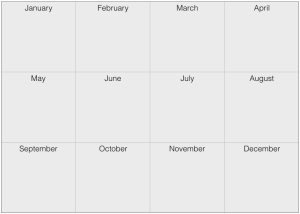
Simply take out a sheet of paper and put 12 boxes on it.
[shareable text=”These 12 simple boxes can change your email strategy for an entire year. Click to find out how.”]These 12 simple boxes can change your email strategy for an entire year.[/shareable]
Draw to vertical lines on the piece paper, then draw three horizontal lines on the piece paper,
Simply label each one of these boxes with a month and year. See screen capture.
2) Write the Articles
Start something short and easy.
- If you run workshops, give people your lessons learned from an event that you just held.
- Give people your thought for the day, or an inspiring quote.
- If you are an author, simply publish a short excerpt from your book.
There is nothing wrong with having all 12 emails be a two-sentence thought for the day.
You are at the very beginning of your email marketing empire, so don’t make it complicated.
All you have to do is take the first step.
Authors out there have the easiest time of any of us experts. You have already created all of your content.
[shareable text=”Authors are the easiest type of expert to transition to email marketing — they already have loads of content!”]Authors are the easiest type of expert to transition to email marketing — they already have loads of content![/shareable]
I know a very successful author who does nothing but the following approach every single day of the year.
He publishes 1-2 paragraphs from one of his books each week. At the bottom of each email he has a link that says “Hey, if you liked this buy a copy of my book” with a link to his digital store.
Simple. Easy to start. Brilliant!
So here are a few examples. You can do this simply to get started.
3) Turn on the Auto Pilot
No matter which email marketing service you choose (MailChimp, Constant Contact, aWeber, etc.), it will come with the ability to schedule your emails for future delivery.
Just create all 12 of your articles and schedule each to publish to your list, say, on the first Tuesday of each month, or whatever works for your readers.
[shareable]When reaching out to your tribe. Make automation your friend.[/shareable]
The point is you can set up all of these posts at once, and then have your email reminders all lined up for the entire year.
[reminder]How often do you publish? Once a month? Irregular? Weekly? Tell us more![/reminder]
by Jason Owens | Apr 8, 2016 | Case Studies
Several months ago I wrote why I quit blogging, and how that decision was a money-maker for me. However, I kept feeling the pull to give blogging one more try.
I started an experiment in early March to find out once and for all if the hype is true — would blogging on a consistent basis really drive more traffic to my site and grow my email list?
Sure, consistent publishing works for others, but will it really work for me?
What follows are three hypotheses I formed before starting this experiment, the results from a month’s-worth of data gathering, and 3 surprises.
Scope
I intentionally limited the scope of this experiment to my blog. I did not intend to increase my post frequency on Twitter, Facebook, or any other social media outlet.
This is simply limited to my blog and its current subscribers.
[shareable cite=”Jason R Owens”]Can I find the right workflow and/or discipline to publish on my blog for 30 days?[/shareable]
Something else that is important to note here is that I am focusing on the act of publishing alone. I’m not paying any particular attention to SEO or any type of optimization techniques whatsoever.
I simply want to see if I can get in the habit of generating 12 blog articles a month.
If I find the experiment is successful over the first 30 days, I’ll work in additional things such as SEO in the future.
Hypothesis 1 – I will lose the majority of my subscribers
I have to admit, I entered this experiment as more of a pessimist than an optimist.
I felt that emailing my existing list multiple times during the week would only alienate people, causing them to complain or unsubscribe.
Reality – I lost only 7 subscribers.
Hypothesis 2 – My open rates will drop to practically nothing
Again, I figured I would be annoying the daylights out of my existing list, so I figured that they would get tired of looking at my emails and not open them.
- The top line (blue-green) shows my open rates. At the very beginning of the month my open rate was just a little above 30% and holds at 25% at the end of the month.
- Red dashed line is what MailChimp reports as being the industry standard (16%) open rate for emails in the education industry.
- The solid blue line on the bottom is my click-through rate, aka CTR.
Reality – Over the course of the month my email open rates only dropped by about 5 percentage points. This was a big surprise to me, and it was very encouraging.
Certainly I have a lot of work to do to increase my click-through rates, but the good news is that it looks like people will stick around for the journey.
Hypothesis 3 – Traffic to my blog will not increase
When I published articles in the past, I might get excited about it for a week or two, but my enthusiasm would then fall away because I wasn’t seeing any real results on my blog.
This is what caused me to form this educated guess about my traffic not increasing. I figured I was just going to see more of the same results I’ve seen in the past.
Before I show you the overall results, let me add the caveat about my paid search traffic in the month before my March experiment.
I really enjoy running Facebook ads, and I ran a few in February.
In the graphic below you can see that in February I had 237 people visit my site from Facebook. You can also see that I ran no ads in March, therefore 0 Paid Search traffic.
The question now becomes: did my frequent publication on my blog make up for the lost traffic from Facebook?
In the image below you can see the big metrics — both Sessions and Users — were down, 26% and 40%, respectively.
Interpretation: Rather than buying traffic through ads, I was able to replace 74% of my traffic (100% – 26%) with non-paid means such as:
- Email (additional 23 sessions vs. prior month)
- Organic reach (additional 71 sessions vs. prior month)
- RSS visitors (additional 29 visits vs. prior month)
- People discovering my site through the Disqus commenting system (additional 38 visits vs. prior month)
As one would expect, I saw significant increases (over 650%) in people clicking through to my site from the emails I had sent.
My RSS readers more than doubled! (170% increase)
People clicking to my site from the Disqus commenting system accounted for gains as well.
Reality — While I lost paid traffic by my own choosing, I added gains in organic reach, email traffic, RSS traffic, and traffic from my Disqus commenting system.
[shareable text=”Regularly publishing to your blog really does improve your results! Click to find out more.”]Regularly publishing to your blog really does improve your results! [/shareable]
Unexpected Bonus #1 – I gained new email subscribers
Several weeks ago I subscribed to a product called OptinMonster.
The idea here is that you can create great opt-in forms for use on your website.
The type of opt-in form that attracted me is what is called an “after-post opt-in”. If you scroll down to the bottom of this email you will see an example of an after-post opt-in form.
When I was taking the stats for this blog post I was blown away to find out that my very first after-post form had already collected three conversions!
I know, I know. The purists out there will tell me that a conversion rate of 2.2% is dismal, and that they are able to get a 98% opt-in rate from people who have been dead for 2 years.
Congratulations to them. I’m just happy to be on the board here.
This is my very first step and my very first success in using an after-post opt-in. I can’t wait to do even more of these in the future.
Unexpected Bonus #2 – Organic traffic to my site more than doubled.
This one caught me by complete surprise.
As I said before, in my earlier attempts at blogging I would get very discouraged because I wasn’t seeing any improvement to my blog’s traffic numbers.
What blew me away is that this month my organic traffic more than doubled.
I’ll reiterate what I mentioned earlier. I made little attempt to optimize these articles to be noticed by a search engine.
In the image below you can see my site traffic has increased by 129%!
With the success here, I’m now even more emboldened to try some SEO tactics in the next 30 to 60 days as I continue this experiment.
Unexpected Bonus #3 – I gained new YouTube subscribers
I mentioned before that my schedule called for creating one video each week.
I post these videos out to my YouTube channel so that YouTube can host the videos, and I also publish links to these videos on my blog.
What surprised me here is that my increased activity on YouTube also drew three more subscribers to my YouTube channel.
My YouTube base is minuscule, and I haven’t been focusing on it for years.
I had five subscribers at the beginning of March, and now I have an additional three that I just added in the past 30 days with zero effort whatsoever on my part to grow my YouTube subscribers.
This is just an extra bonus that happened, and I wasn’t even looking for it.
Conclusion
I had a blast publishing the articles and then collecting the data. My key takeaways are:
- Publishing is a lot of work. It pays to have someone help you.
- Your audience will not abandon you. Just be certain to continue providing content they want.
- I now believe that publishing more frequently actually does grow the organic traffic to my site!
- After-post opt-in forms work. Again, just make certain to provide great content.
- I should add Facebook traffic for specific product-based campaigns.
- I realized unintended gains in my YouTube subscribers.
[reminder]What is your experience with publishing regularly to your blog and/or your email list? Does it work for you? If so, please share![/reminder]
by Jason Owens | Apr 4, 2016 | Uncategorized
[youtube id=”3OafWfhXOCM”]
Showing up for yourself, for your business, and for your family are key ingredients to being a fulfilled entrepreneur.
Today’s video contains one question you need to ask to guarantee your happiness.
[reminder]How can you start showing up for yourself this week?[/reminder]
by Jason Owens | Mar 23, 2016 | Uncategorized
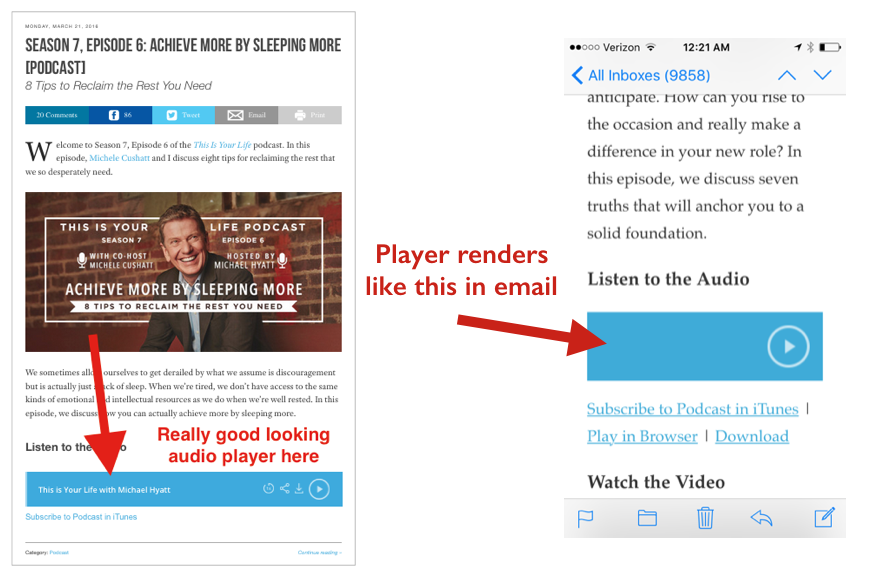
I am a huge fan of Michael Hyatt, his GetNoticed! theme, and Platform University. I really like how he is using the Smart Podcast Player, but I couldn’t figure out how to make it work when using RSS with MailChimp.
I really enjoy watching how Michael and his team accomplish what seems to be the impossible each week.
Recently I have considered reviving my podcast, so I turned my attention to how Michael does it.
The User Experience I Want to Emulate
In particular I want to be able to use RSS to feed my blog posts and my podcasts to my reading list.
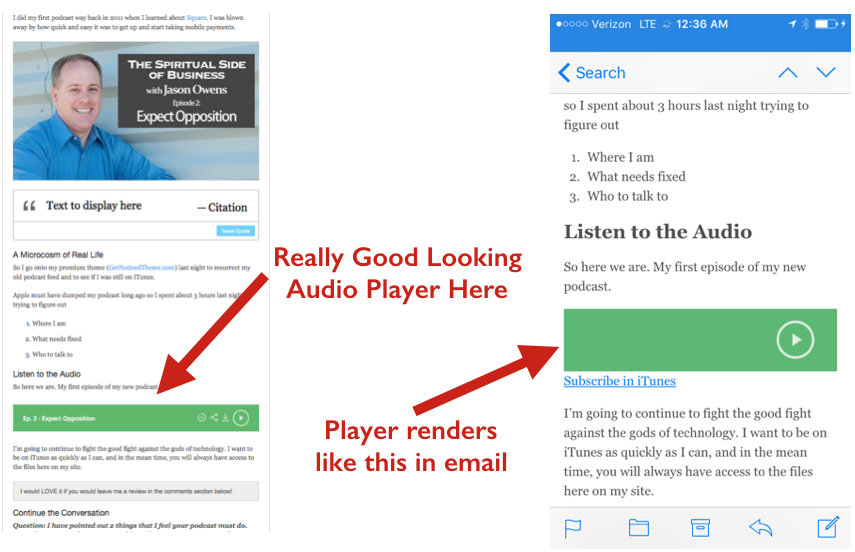
I really like the look of the audio player that Michael uses. I don’t get around much so I had never seen this player before, and I just assumed that this was one of the custom coded things that Michael does for his site.
Not so.
Turns out the player is the Smart Podcast Player available (for a small fee) by Pat Flynn.
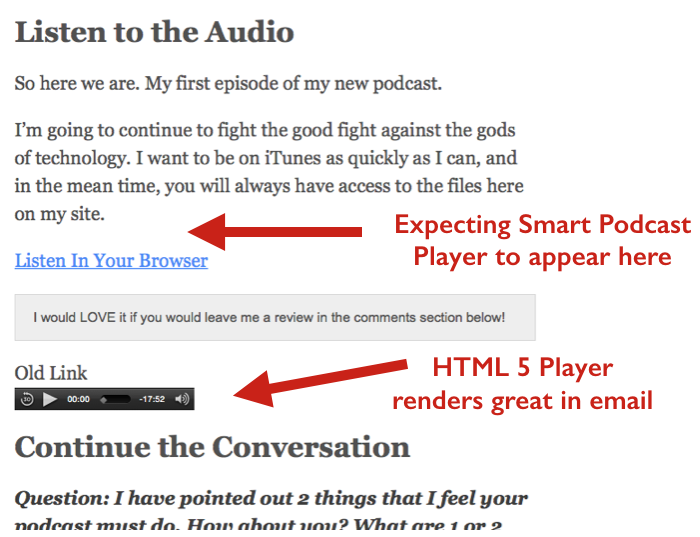
I subscribed to this WordPress plugin to test out the player on my site. I was very surprised to learn that the player does NOT survive the transition through RSS to my MailChimp emails!
Trouble in River City
After installing the plugin and putting the player in a test post on my bl0g, I sent the post to MailChimp.
No Smart Podcast Player appeared in the ensuing email.
At all.
Not even a hint that a player ever existed in the original post.
At first I found this really hard to believe. I thought for certain that the plugin was some HTML5 player that does well in email.
I had tested HTML5 players before, and I did not experience this problem. They survived the same RSS-to-MailChimp test with ease as evidenced in the following screen capture.
What to Do?
I took a second look at Michael’s email that I was using as a baseline. Turns out the “player” that shows in this email is not a player at all.
It is just an image with a built-in link.
This was confirmed after hearing back from the tech support person (Ray) at the Smart Podcast Player Support Team.
So now I have a dilemma.
Why do emails sent through MailChimp via RSS from the website show an image that does not exist in the blog post?
I can’t tell you exactly how long I beat my brains out over this.
I’m not a coder, but I eventually figured out how to do it. At least this method works for me.
Here’s the Answer
There are two parts – 1) the code that you’ll need, and 2) a clickable image that looks like the player
It turns out that you need to use something called a “fallback” image. Again, I’m not a coder, so I had never heard of this.
A fallback is your plan B in the event that something doesn’t load properly. In this case, if the player doesn’t load properly, then resort to plan B — our image that looks like the player.
The Code
I had to comb through the plugin code to learn how to call the plugin without using the shortcode. This is important because I could not figure out how to make the fallback image work while using the shortcode.
In the code snippet below you will notice that I do, however, start with the shortcode. Notice how the url field is empty and no other parameters are listed.
I had to do this to “wake up” the player to let it know I would be passing it some parameters. There must be some javascript here that calls the player to attention.
This is a critical step, so do not leave out this initial shortcode. I could not get the rest of this to work otherwise.
[smart_track_player url=" "]

<object class="smart-track-player" width="300" height="150" data-url="http://traffic.libsyn.com/Your_Podcast_Name/Your_Podcast_Episode.mp3" data-download="true"
data-speedcontrol="true" data-title="Your show title here" data-paid="true" data-social="true" data-social_twitter="true" data-social_facebook="true" data-social_gplus="true">
<a href="http://traffic.libsyn.com/Your_Podcast_Name/Your_Podcast_Episode.mp3"><img src="http://yourdomain.com/wp-content/uploads/20xx/yy/Your_Fallback_Image.png" alt="Click to hear Jason's Podcast" border="0" /></a>
<a href="https://itunes.apple.com/us/podcast/itunes_podcast_name/idXXXXXXXXX">Subscribe in iTunes</a></object>
In the event that you want to look for more parameters to pass in this html, try this:
- Go to WordPress -> Plugins -> Editor
- Select Smart Podcast Player from the dropdown
- Find and double-click on smart-podcast-player/classes/core.php in the right-hand menu
I found all of the parameters I needed by going through this core.php file. Do a search on “<div” (yes, leave out the last “>”) and this should take you to about the middle of the file where the parameters live.
The Image
I created the image by creating an instance of the player and then simply taking a screen capture (on Macs, use command+shift+4).
You might be wondering how to get the player to look like the one that Michael uses. Notice how his player has only the arrow and the circle. The download icon, the speed icon, and the share icon are all missing.
If you want to create a version of this all you need to do is use the code above but strip out the parameters defining social and downloads, etc. Try pasting this code to your site.
<object class="smart-track-player" width="300" height="150" data-url="http://traffic.libsyn.com/YourPodcastShow/Your_Podcast_Episode.mp3" data-paid="true">
Just preview the post and then take a screen capture of the image.
Trim out the left half of the bar with a photo/image editor. Otherwise, you will get a long thin bar (above) instead of a shorter one (below) which looks better on mobile.
Upload this to your WordPress media library and then put the image url in the first code snippet I provided.
The Results
Now I have a podcast post that functions much the way Michael’s does in that I can pass the “player” in an email that is generated through RSS!
[reminder]If I can answer any questions for you, just drop them into the Disqus box below.[/reminder]
by Jason Owens | Mar 21, 2016 | Uncategorized
[youtube id=”UZlsygkWKxU”]
This short video will help you grow more than any single activity you do this year.
This quick exercise that you can do in less than a minute will lay the foundation to more success than you think possible.
Click now to get started.
![003: How to Build Your Public Speaking Dynasty [Podcast]](https://jasonrowens.com/wp-content/uploads/2016/12/Jason-Owens-Podcast-Episode-3-How-to-Build-a-Speaking-Dynasty-An-Interview-with-Joe-Phillips.jpg)








 In particular I want to be able to use RSS to feed my blog posts and my podcasts to my reading list.